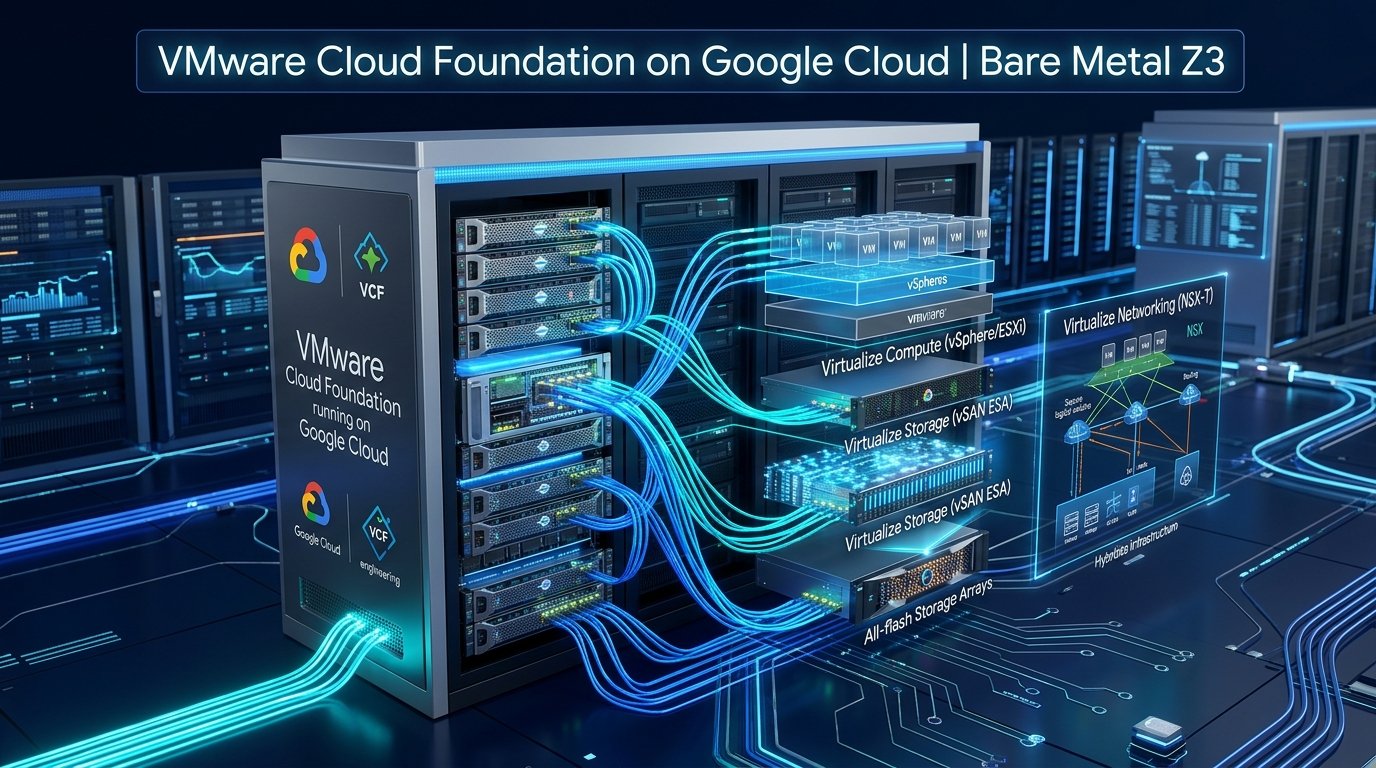
Figure 1: High-level system architecture of VMware Cloud Foundation running natively on Google Cloud Bare Metal Z3 instances.
1. The Paradigm Shift: From Managed Engine to Self-Managed VCF
When Google Cloud first introduced VMware support, the primary enterprise consumption model was Google Cloud VMware Engine (GCVE). While GCVE continues to serve organizations seeking a fully managed SaaS-like operational tier, a growing cohort of Fortune 500 enterprises, regulated financial institutions, and telecommunication carriers require complete administrative autonomy over their hypervisors.
Enter Google Cloud Self-Managed VMware Solution (SMVS). By leveraging Google's third-generation Z3 (C3-Metal) bare-metal compute instances, enterprises can deploy native VMware Cloud Foundation (VCF 5.x / VCF 9.x) utilizing their own portable Broadcom enterprise licenses (BYOL). There are no cloud-provider management intermediaries, no restrictive hypervisor version locks, and no synthetic compute overhead.
To eliminate the friction of provisioning bare-metal hardware, multi-NIC virtual networks, Layer 2 broadcast emulation, and initial vCenter-less bootstrapping, Google released the open-source self-managed-vmware-solution-toolkit. This article breaks down everything required to deploy a production private cloud using this kit—explaining what lies below the stack, what assumptions are baked in, and the exact chronological execution required for success.
2. What Lies Below the Deployment: Architectural Underpinnings
Deploying VMware on a hyperscaler is fundamentally different from installing ESXi on a traditional Dell PowerEdge or HPE ProLiant server in a colocation facility. Understanding the underlying plumbing is essential before running a single Terraform script.
flowchart TD
    subgraph GCP_Project["GCP Project Scope (VPC MTU 8896)"]
        subgraph Mgmt_Plane["Security & Management Infrastructure"]
            Jumpbox["GCE Jumpbox Bastion
(Internal IP Only, IAP Tunneled)"]
            SecMgr["Google Secret Manager
(ESXi & VCF Cryptographic Secrets)"]
            CloudDNS["Cloud DNS Private Zones
(Forward & Reverse PTR Resolvers)"]
            PSC["Private Service Connect (PSC)
(Google Offline Depot /29)"]
        end

        subgraph ILB_Plane["Regional Internal Passthrough Load Balancers"]
            ILB_SDDC["ILB: sddcm.smvs.test"]
            ILB_VC["ILB: vc01.smvs.test"]
            ILB_NSX["ILB: nsx01-04.smvs.test"]
            DriftMgr["GCVE Drift Manager (P4SA)
Real-Time Leader Host Reconciliation"]
        end

        subgraph BareMetal_Nodes["ESXi Bare Metal Compute Pool (z3-highmem-192-highlssd-metal)"]
            Node1["Host 1 (Deployment Leader)
vSwitch0 + Local vSAN ESA"]
            Node2["Host 2
vSAN ESA Cluster Member"]
            Node3["Host 3
vSAN ESA Cluster Member"]
            Node4["Host 4
vSAN ESA Cluster Member"]
        end

        subgraph Appliances_Inside_ESXi["Nested VMware Management Appliances"]
            SDDC_VM["VCF Installer (Cloud Builder) / SDDC Manager"]
            VC_VM["vCenter Server Appliance (VCSA)"]
            NSX_VM["NSX Manager 3-Node Cluster"]
        end
    end

    Jumpbox -->|Runs Phase 1-3 Python| Node1
    Jumpbox -->|Audits Passwords| SecMgr
    PSC -->|Streams 15GB SDDC OVA| Node1
    Node1 -->|Hosts Initial VM| SDDC_VM
    ILB_SDDC -->|Forwards to Leader| Node1
    DriftMgr -.->|Reconciles vMotion Moves| ILB_Plane
Figure 2: Architectural interaction model between Google Cloud infrastructure, bare-metal nodes, and nested VMware appliances.
Here is the critical translation layer between traditional on-prem VMware and Google Cloud bare metal:
-
Z3 Bare-Metal Instances (
z3-highmem-192-highlssd-metal): These are physical servers powered by 4th Gen Intel Xeon Scalable processors (Sapphire Rapids) with 192 vCPUs, 1.5 TB of DDR5 RAM, and high-performance local NVMe SSDs. ESXi boots directly off bare metal; there is zero nested hypervisor virtualization penalty. - Layer 2 Broadcast VPC Subnets: Standard Google Cloud VPCs operate strictly at Layer 3 without native ARP broadcast or multicast. To accommodate VMware's multi-interface requirements, Google Cloud bare metal provides custom L2 broadcast subnets mapped to 4 dedicated physical NICs on each host.
- Regional Internal Load Balancers (ILBs) & Zonal NEGs: Because VMware management appliances (vCenter, SDDC Manager, NSX Manager) run as VMs *inside* ESXi, Google Cloud's VPC routers cannot naturally route to their inner virtual MAC addresses. Google Cloud resolves this by using Regional Internal Passthrough Load Balancers attached to Zonal Network Endpoint Groups (NEGs) pointing to the ESXi host.
- GCVE Drift Manager (P4SA): When a management appliance vMotions or fails over to a different ESXi host, its network attachment moves. The Google Cloud Drift Manager (a Per-Product Per-Project Service Account) detects appliance MAC address shifts and updates the Regional ILB's backend leader instance in milliseconds.
- Private Service Connect (PSC) Offline Depot: To deploy SDDC Manager, ESXi must download a 15+ GB appliance OVA. Instead of requiring public internet exposure, Google hosts a secure, regional Offline Depot reachable via Private Service Connect over Google's internal backbone.
3. Foundational Assumptions Made by the Architecture & Toolkit
Before undertaking this deployment, you must verify that your technical environment and governance model align with the toolkit's design assumptions:
| Architectural Domain | Core Assumption | Operational Impact |
|---|---|---|
| Licensing (BYOL) | Active VMware Cloud Foundation (VCF 5.x or 9.x) Enterprise Subscription | You must supply your own valid Broadcom license keys for vSphere, vSAN, NSX, and Aria Suite. |
| Isolation & Public IP | Strict Zero-Trust VPC; No Public IPs assigned to ESXi or appliances | All administrative access, deployment pipelines, and browser dashboards must traverse Identity-Aware Proxy (IAP) tunnels. |
| Network Topology | Dedicated or Shared VPC with MTU 8896 Jumbo Frames enabled | Standard 1500 MTU VPCs cannot be used; vSAN ESA and NSX Geneve overlays will immediately drop packets. |
| Cluster Minimum | Management Domain requires a minimum of 4 Bare-Metal Nodes | VCF architecture mandates at least 4 hosts to satisfy vSAN ESA RAID-5/RAID-6 storage policies and high availability. |
| DNS Authority | Authoritative Forward & Reverse Lookup Zones bound to VPC | Every host, load balancer VIP, and appliance must have bi-directional (A and PTR) resolution configured prior to bringup. |
4. What You Must Have Before Proceeding (Readiness Checklist)
Do not initiate Terraform until all items in this readiness checklist are physically verified in your GCP console:
A. GCP Quotas & Hardware Availability
By default, new Google Cloud projects possess zero quota for bare-metal instances. You must request and receive approval for:
- Compute Engine API - Z3 Metal Instances: Minimum 4 instances in your target zone (e.g.,
us-east4-corus-central1-a). - Internal IP Addresses / Forwarding Rules: Minimum 50 addresses (to support all management appliances, vSAN endpoints, and vMotion VIPs).
- Subnetworks & Routes: Minimum 10 within the target region.
B. Required Service APIs
Execute the following command to enable all mandatory infrastructure and management APIs:
C. Secret Manager Credentials & Strict Password Gates
The automated Python orchestrator retrieves root and local user passwords directly from Google Cloud Secret Manager. It executes rigorous pre-flight validation gates. If any password fails these constraints, Phase 1 aborts immediately:
- ESXi Root Password (
esxi-root-password): Must be between 7 and 39 characters, include at least 3 character classes (uppercase, lowercase, digits, symbols), and MUST NOT contain the word "root" (case-insensitive). - VCF Appliance Root Password (
vcf-root-password): Must be at least 15 characters and contain all 4 character classes. - VCF Appliance Local User Password (
vcf-localuser-password): Must be at least 12 characters and contain all 4 character classes.
5. Core Network Topology & Google Cloud Andromeda Integration
Google Cloud's Andromeda SDN provides the high-throughput, sub-millisecond networking backbone required for bare-metal ESXi clusters. Each Z3 bare-metal machine connects via 4 physical network interfaces (pNICs) plumbed into distinct L2 subnets:
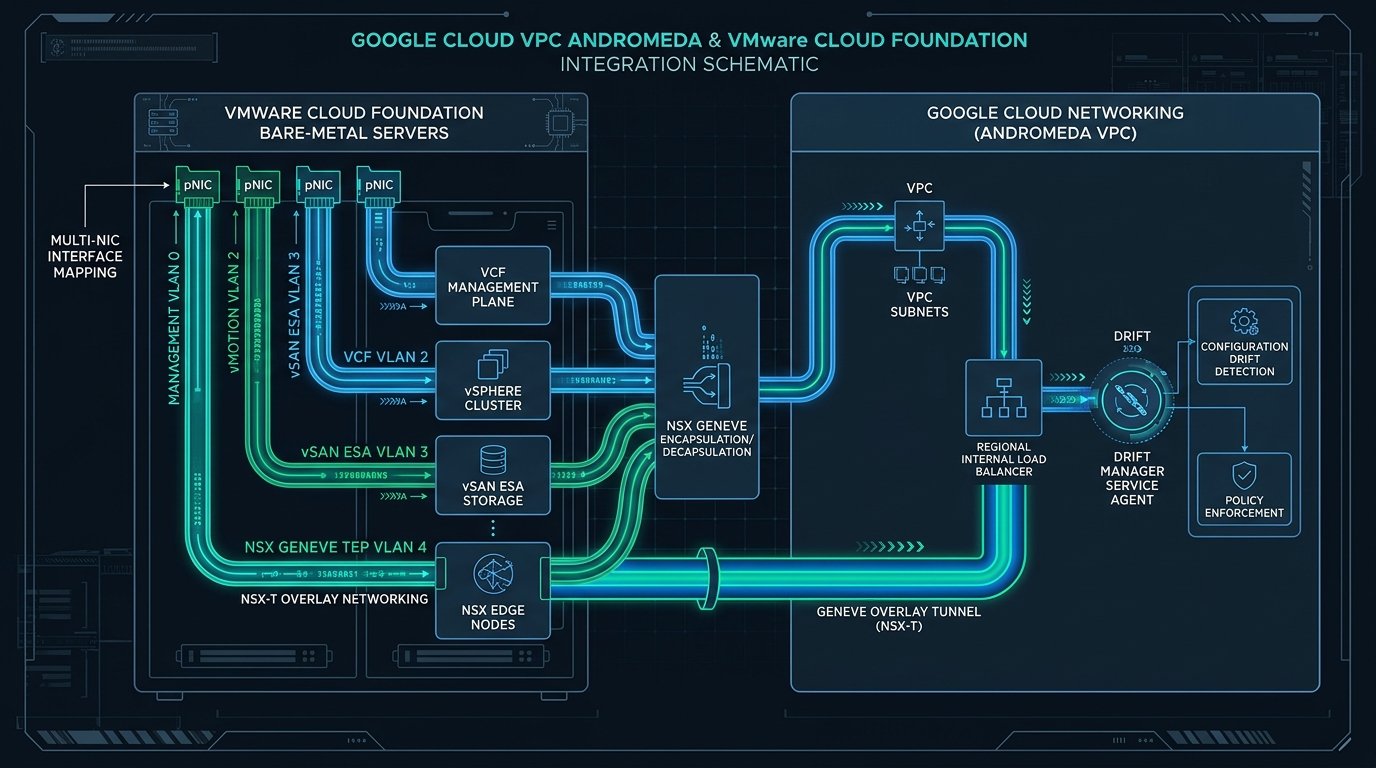
Figure 3: Multi-NIC physical interface mapping into Google Cloud Andromeda VPC subnets and Regional Load Balancers.
| Interface | Subnet CIDR Example | VLAN ID | Traffic Profile & MTU |
|---|---|---|---|
| vmnic0 (Management) | 10.200.0.0/24 |
VLAN 0 (Untagged) | ESXi Management, vCenter, SDDC Manager, NSX Manager (MTU 8896) |
| vmnic1 (vMotion) | 10.200.1.0/24 |
VLAN 2 (Tagged) | Non-routed, high-speed VM live migrations across hosts (MTU 8896) |
| vmnic2 (vSAN ESA) | 10.200.2.0/24 |
VLAN 3 (Tagged) | NVMe-oF, distributed object replication & snapshot sync (MTU 8896) |
| vmnic3 (NSX TEP) | 10.200.3.0/24 |
VLAN 4 (Tagged) | Geneve overlay tunnel endpoints for virtualized workloads (MTU 8896) |
| Offline Depot (PSC) | 10.200.100.0/29 |
N/A (L3 Endpoint) | Dedicated private endpoint for streaming VCF installation media |
.0: Network address (Reserved by GCP).1: Default Gateway (Reserved by GCP).2: Cloud DNS Inbound Forwarder Resolver IP (Reserved automatically across ALL subnets when a DNS Inbound Policy is attached to the VPC!).254: Second-to-last IP (Reserved by GCP).255: Broadcast IP (Reserved by GCP)
.2 to any ESXi host or appliance. Start host IPs from .3 and management appliances from .9.
6. Stage 0: Cloud Setup & Workspace Preparation
Clone the toolkit repository locally on your workstation or Cloud Shell:
7. Stage 1: Deploying the IAP-Secured Jumpbox
Because the bare-metal ESXi hypervisors and VMware appliances are completely air-gapped from the public internet, all configuration must be executed from a hardened Jumpbox inside the VPC.
Step 1.1: Configure Jumpbox IAM Roles
Step 1.2: Deploy Jumpbox Infrastructure
Step 1.3: Verify Connection via IAP SSH
8. Stage 2: Core VMware Infrastructure via Terraform
The e2e-terraform module is the heart of the hardware and network provisioning phase. It builds the VPC, provisions the 4 subnets, creates Zonal NEGs, applies server anti-affinity placement policies, boots the 4 physical ESXi hosts, registers Cloud DNS zones, and deploys Regional Load Balancer Forwarding Rules for every VMware appliance.
Execute the Terraform workflow:
Note: Provisioning physical Z3 bare-metal instances takes approximately 15 to 25 minutes.
9. Stage 3: Exporting the Configuration Bridges
Rather than requiring tedious manual translation of Terraform resource outputs into VMware JSON configurations, the toolkit provides an automated exporter script: scripts/export_deployment_config.py.
This produces two strictly formatted artifacts:
python_scripts_input_config.json: Consumed directly by the Jumpbox Python orchestrator.management_domain_deployment_input.json: The official VCF Cloud Builder deployment workbook.
10. Stage 4: Automated VCF Orchestration on the Jumpbox
Copy the repository and generated configs onto the Jumpbox, then execute the Python deployment pipeline:
- Phase 1: Pre-Deployment Validation & Extraction: Audits Secret Manager passwords, validates ESXi node readiness, configures the Offline Depot `/29` subnet and Private Service Connect endpoint, fetches the depot SSL thumbprint, and binds IAM permissions for the Drift Manager service agent.
- Phase 2: ESXi Root Password Rotation: Connects to all 4 bare-metal hosts and rotates default passwords to the secure password stored in Secret Manager.
- Phase 3a-e: SDDC Manager Bootstrapping: Provisions target VLAN port group on `vSwitch0`, runs `/sbin/vdq -q` to claim local NVMe SSDs and initialize a single-node vSAN ESA datastore, streams the 15GB SDDC Manager OVA across PSC directly to ESXi, injects vCenter-less OVF properties (
guestinfo.ovfEnv), and powers on the VM.
11. Stage 5: Cloud DNS Synchronization & The NTP Lifecycle
Run the automated DNS synchronization script to populate all forward (A) and reverse (PTR) records:
The Fix: Point
ntp.smvs.test to a routable IP address (e.g. 10.254.254.250) during pre-validation. Once validation passes and bringup starts, switch it back to 169.254.169.254.
12. Stage 6: Final VCF Management Domain Bringup
Because the SDDC Manager appliance lives inside the private VPC on `10.200.0.9`, open a secure SOCKS5 proxy tunnel from your local workstation:
Configure your browser with SOCKS proxy 127.0.0.1:1080 (resolving remote DNS), and navigate to:
👉 https://sddcm.smvs.test (or https://10.200.0.9)
- Log in with user
adminand your Secret Managervcf-localuser-password. - Upload
management_domain_deployment_input.json. - Click Validate to execute 100+ VMware pre-flight checks.
- Execute the NTP switch to Google's metadata server:
NTP SwitchBashpython3 scripts/cloud_dns/vcf_cloud_dns_sync.py \ --project-id "my-gcp-project-id" \ --vpc-network "vcf-mgmt-vpc" \ --domain "smvs.test" \ --set-ntp-ip "169.254.169.254"
- Click Deploy. Over the next 90–120 minutes, Cloud Builder automatically deploys vCenter Server, sets up the 3-node NSX Manager cluster, configures vDS with MTU 8896, and forms the cluster-wide vSAN ESA datastore.
13. Day-2 Lifecycle Operations
The toolkit natively manages day-2 cluster modifications via the deployment_mode variable:
-
Scaling Out (
deployment_mode = "node_addition"): Incrementnumber_of_nodes, supply new IP addresses for the 4 interfaces, and runterraform apply. Terraform provisions the host, boot disk, and DNS records, and outputs the command to attach the node to Zonal NEGs. -
Scaling In (
deployment_mode = "node_deletion"): Decommission the node inside SDDC Manager first. Then setdeployment_mode = "node_deletion", explicitly specify remaining nodes innode_names, and apply Terraform. -
Adding Appliances (
deployment_mode = "appliance_addition"): Add new appliance names and IPs tomgmt_ip_valuesornsx_ip_valuesto provision Regional ILB forwarding rules and DNS records without altering running compute nodes.
14. VMware Expert Runbook: Top 6 Gotchas & Fixes
| Symptom / Failure | Root Cause | Prescriptive Resolution |
|---|---|---|
ValidationError: Secret fails complexity |
Password does not satisfy character class or length boundaries. | Update Secret Manager. ESXi: 7–39 chars, no "root". VCF: >= 15 chars, 4 classes. |
IP 10.200.0.2 is already reserved |
GCP claims .2 for Cloud DNS inbound policy resolver. |
Skip .2 in all subnets. Start hosts at .3 and appliances at .9. |
vSAN packet drop / MTU alert |
VPC or subnets created with default MTU 1460/1500. | Destroy and recreate VPC with mtu = 8896 (Jumbo Frames). |
IAP Tunnel Error 4003 |
Missing IAM role or missing IAP ingress firewall rule. | Apply smvs-toolkit-jumpbox-tf/iam; allow 35.235.240.0/20 on port 22. |
Drift Manager Permission Denied |
Drift Manager P4SA missing roles/compute.networkAdmin. |
Grant role to service-<num>@gcp-sa-network-drift.iam.gserviceaccount.com. |
Cloud Builder NTP Pre-Check Fails |
VMware rejects 169.254.169.254 link-local address. |
Point NTP record to bootstrap IP during validation, then cut over post-validation. |
15. Summary & Key Takeaways
Running VMware Cloud Foundation natively on Google Cloud bare metal unlocks an unprecedented combination of infrastructure elasticity and operational sovereignty. By shifting away from opaque managed services toward an open-source, automated Infrastructure-as-Code pipeline, enterprise engineering teams retain full architectural control while capitalizing on Google's Andromeda SDN and global datacenter scale.

Written by Moinul Haque
Practicing infrastructure architect documenting VMware systems engineering, hyperscaler bare-metal integrations, and production hypervisors.